Finding Suspicious Traffic using CloudWatch Log Insights and VPC Flow Logs

·153 words·1 min
FTC Disclosure: As an Amazon Associate, I earn from qualifying purchases. Some links on this site are affiliate links.
Ben Piper
Author
Ben Piper
Wiley bestselling author — 100k+ copies, AWS Solutions Architect Associate (SAA) & Cloud Practitioner (CLF) bestsellers, 7+ books. 45 Pluralsight courses (4.7-star, 3,003 ratings). 10+ yrs 100% remote, solo CCNP ENCOR.

While playing around with AWS CloudWatch Log Insights to analyze VPC flow logs, I thought of a couple of fun ways to identify (probably) malicious traffic.

Finding Vulnerability Scanners
#

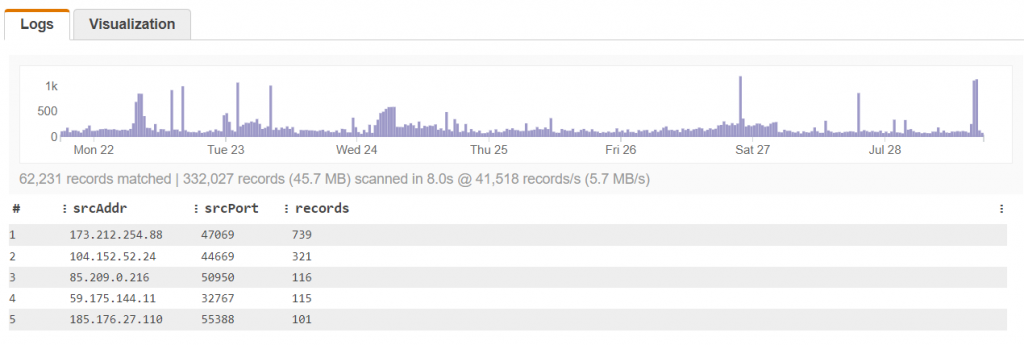
These are the guys that hammer your box looking for anything from silly SQL injection attacks (so 2005) to CSRF vulnerabilities . The tell: look for hosts that reuse the same source port.

The Query
#

filter (srcPort > 1024 and srcAddr != "private-IP") |
stats count(*) as records by srcAddr,srcPort |
sort records desc |
limit 5

The Results
#

Suspicious traffic from the same source port

Finding Port Scanners
#

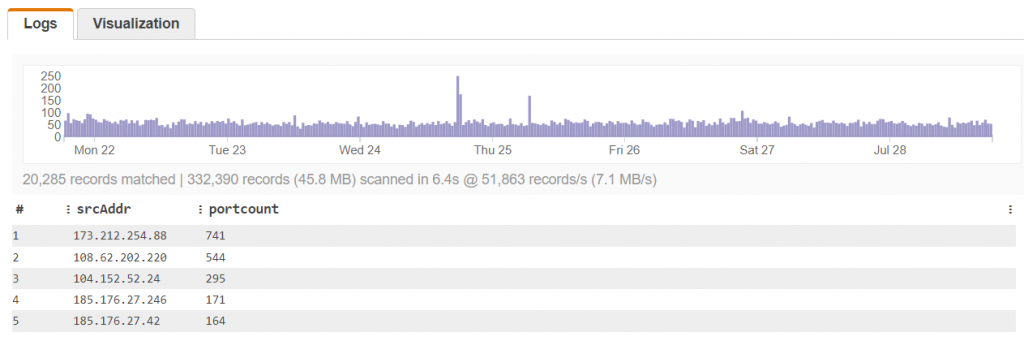
They just want to know if anybody’s listening. The tell: sending packets to a bunch of closed ports.

The Query
#

filter (action="REJECT") |
stats count_distinct(dstPort) as portcount by srcAddr |
sort portcount desc |
limit 5

The Results
#

The same source sending packets to a bunch of different ports